Studying with the Deck
The deck is organised by tags, not sub-decks. Every card is tagged by subject, rotation, yield, and more — so you choose exactly what to study by suspending and unsuspending cards.
Step 1 — Suspend everything (once)
When you first install, every card is active. Start by suspending them all, then bring back only what you're studying:
- Click Browse (shortcut: B)
- In the sidebar, find Tags → #Malleus_CM
- Click any card in the main window, then select all (Ctrl+A / Cmd+A)
- Right-click (or the Cards menu) → Toggle Suspend (Ctrl+J / Cmd+J)
All cards should now be yellow (suspended). You only ever do this once.
Step 2 — Unsuspend what you're studying
Find the cards for your current topic and unsuspend them the same way (select → Ctrl+J / Cmd+J). Three ways to find them:
Easiest — the Malleus Helper add-on
- Click Tools → Malleus Find/Add Cards (or the Malleus button in the Browser)
- Type a topic (e.g. "Parkinson disease"), select the relevant results, and click Find cards. Optionally add other selectors (e.g. yield or subtag such as management)
- Unsuspend the cards that you want to study
See the add-on guide for everything else it can do.
The tag tree
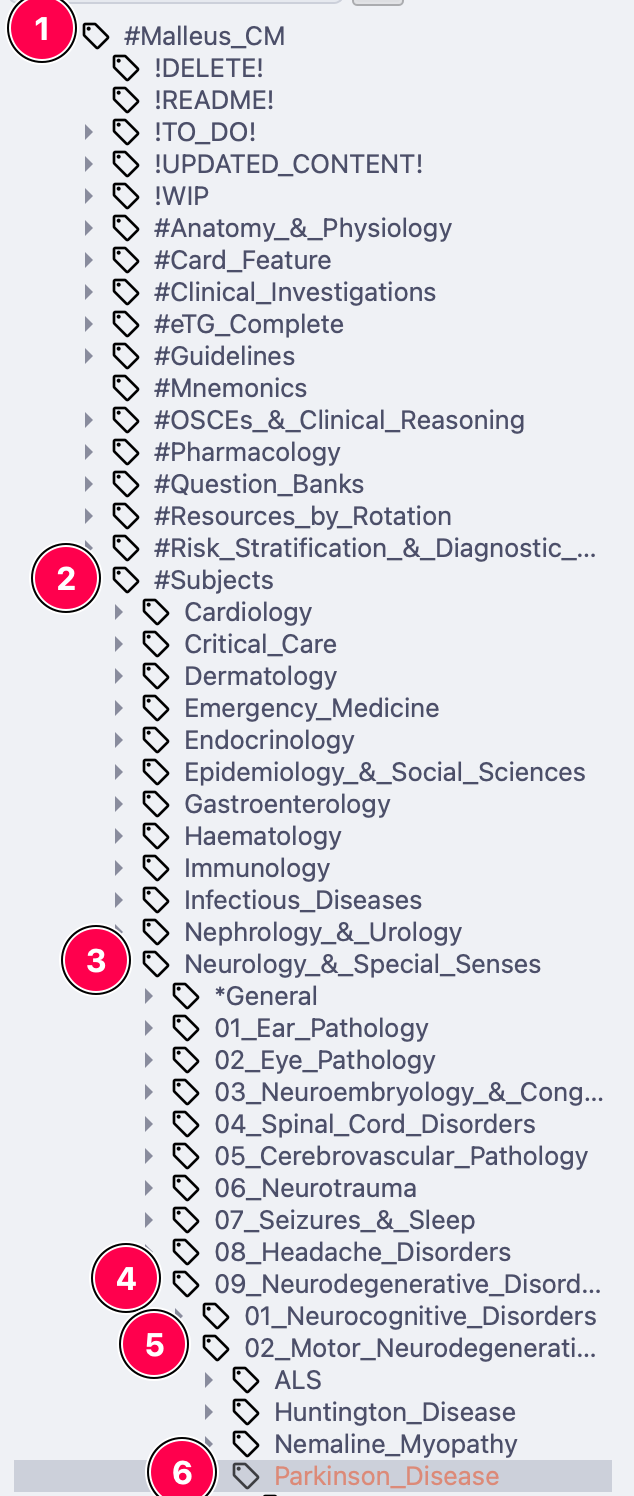
In the Browser sidebar, drill down e.g. #Malleus_CM → #Subjects → Neurology_&_Ophthalmology → 11_Degenerative_Disorders → Parkinson_Disease, or #Malleus_CM → #Resources_by_Rotation → Obstetrics_&_Gynaecology at the start of a rotation.
Doing eMedici questions? Find matching cards in one click
Our browser extension finds the Malleus cards for whatever eMedici question you're on:
- Install the Malleus extension from the Chrome Web Store
- Install the AnkiConnect add-on
- With Anki running, click the extension in your toolbar — an Anki Browser window opens with all the relevant cards, ready to unsuspend or move to a filtered deck
It works on much more than eMedici — see the extension guide.
Step 3 — Review
Back on the Anki main screen, click Malleus Clinical Medicine → Study Now. That's it — do your reviews daily and let spaced repetition do the rest.